Ecommerce Site Search UX: Where Most Sites Fail
Chris Norton 12 min read

A customer emails to ask whether you stock a product you have carried for two years. They searched for it, got nothing useful, and gave up. That email is the unusual part. Most customers who fail a search leave without telling anyone, so the failure never arrives as a complaint or an error, and it can sit unfixed for years without anyone naming it as a problem.
The usual response is to replace the search engine, and often that is warranted. Older search does match too strictly, rank badly, and fall over on a single transposed letter. A modern engine fixes those things, and it gives your merchandisers ranking controls they can use without a developer. Those are real gains against a specific class of failure: the query where your site holds the answer, the words broadly match, and the engine still fails to surface it.
The failures that survive a migration are different in kind. They are queries where nothing in your index could have answered them, no matter how good the matching. A customer searching for your returns policy on a site that only indexes products. A customer searching “hi-vis” against a catalogue that says “high visibility”. A customer looking for a part that fits their car, on a store that holds no data about what fits what. Better matching against the wrong corpus returns nothing useful faster.
This post is for ecommerce managers and heads of digital who have either replaced search and not seen the lift, or are about to and want to know what the migration will not cover. It works through the most common ways site search fails, with Baymard Institute’s benchmark data alongside them where their research measures the same problems.
Start with the query log, not the search bar
Every ecommerce platform and search tool keeps a record of what customers typed into your search box and what they did next. In GA4 it sits under site search. In Shopify, Algolia, Typesense and most search platforms it is a search analytics or top searches report. Whatever your stack calls it, it is the closest thing you have to customers telling you in their own words what they came for. Two things in it matter more than the rest: the searches that returned nothing, and the searches that returned something nobody clicked.
Zero-result queries are the obvious list, and most teams already look at it. It tells you what your index is missing, and it is usually a mix of products you do not stock, spelling variants, and terminology gaps.
The more valuable list is high volume with low click-through. Those searches returned results, so they never appear in a zero-result report, and nobody investigates them. What they represent is a customer who typed something, got a page of products that looked plausible enough to scan, found nothing worth clicking, and left. That is a worse outcome than a zero-result page, because a zero-result page at least tells the customer to try different words.
Most stores have a handful of high-volume, low-click queries that have been failing for years without anyone noticing. They tend to be the same shapes from one site to the next, which is the useful part: the failures are predictable enough to go looking for.
The failures cluster in four places
Your search only searches products
Customers use the search bar as the index for the entire site, because it is the most obvious box on the page. They type “returns policy”, “delivery times”, “click and collect”, “Afterpay”, “store locations”. On most stores, search is wired to the product catalogue and nothing else, so all of it returns nothing.
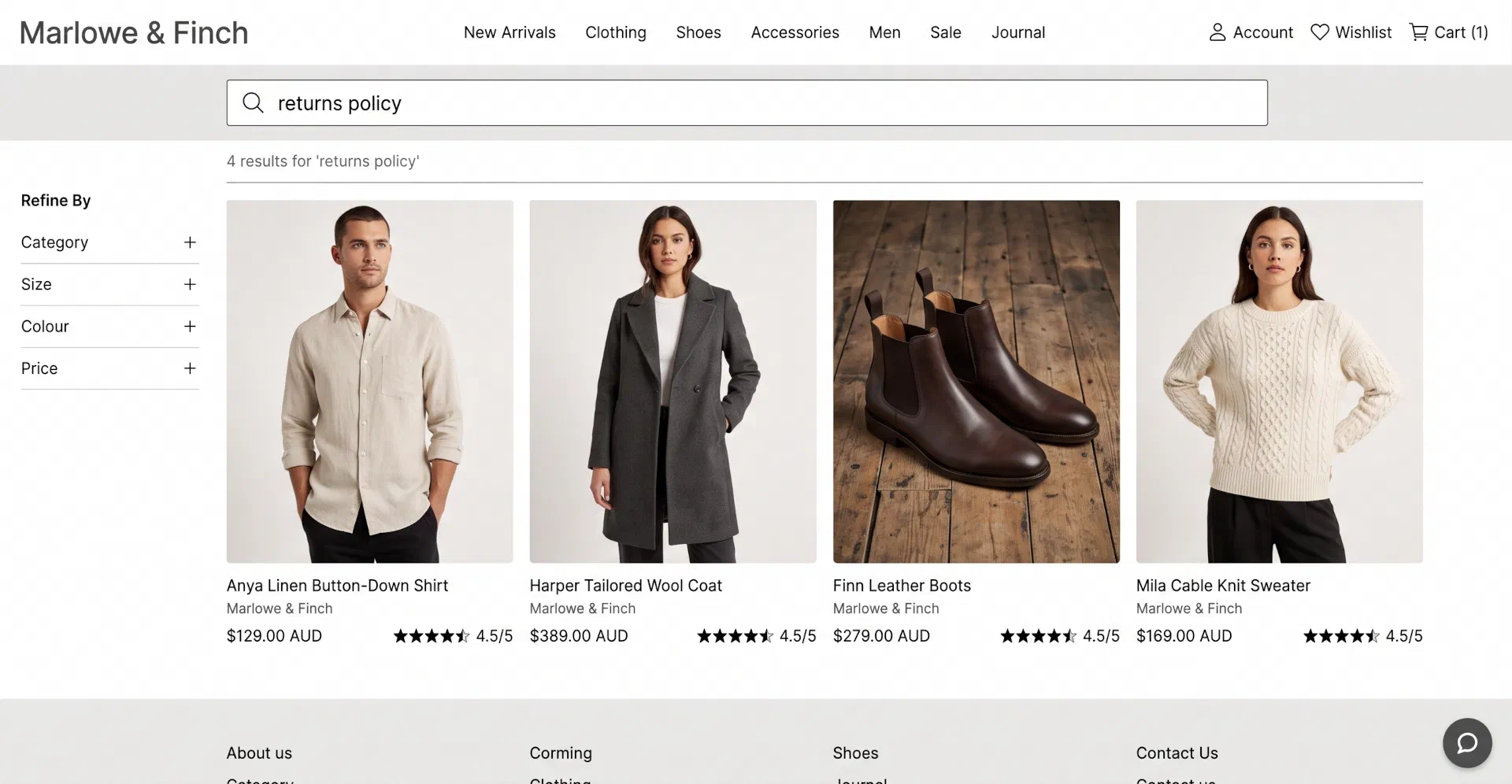
This is rarely a decision anyone made. The policy pages, FAQs and store pages exist, they were simply never added to the index or hooked up to the search box that customers use. It is the cheapest fix on this list and the queries carry high intent, because someone checking your returns policy from the search bar is deciding whether to buy.
Baymard’s benchmark puts non-product queries as the worst-handled type they score, with 66% of sites having issues with them. It scores worse than compatibility and symptom searches, which are far harder problems to solve.
Your customers’ words are not your catalogue’s words
Product titles come from suppliers, and a lot of Australian catalogues are carrying terminology written somewhere else. Your customer searches “torch” and your titles say “flashlight”. They search “doona” and your titles say “duvet”. They search “singlet” and your titles say “tank top”. These are the expensive ones, because the two words share no letters for the engine to work with. Stemming cannot reach from torch to flashlight, typo tolerance has nothing to correct, and the products sit in a category the customer will never be shown.
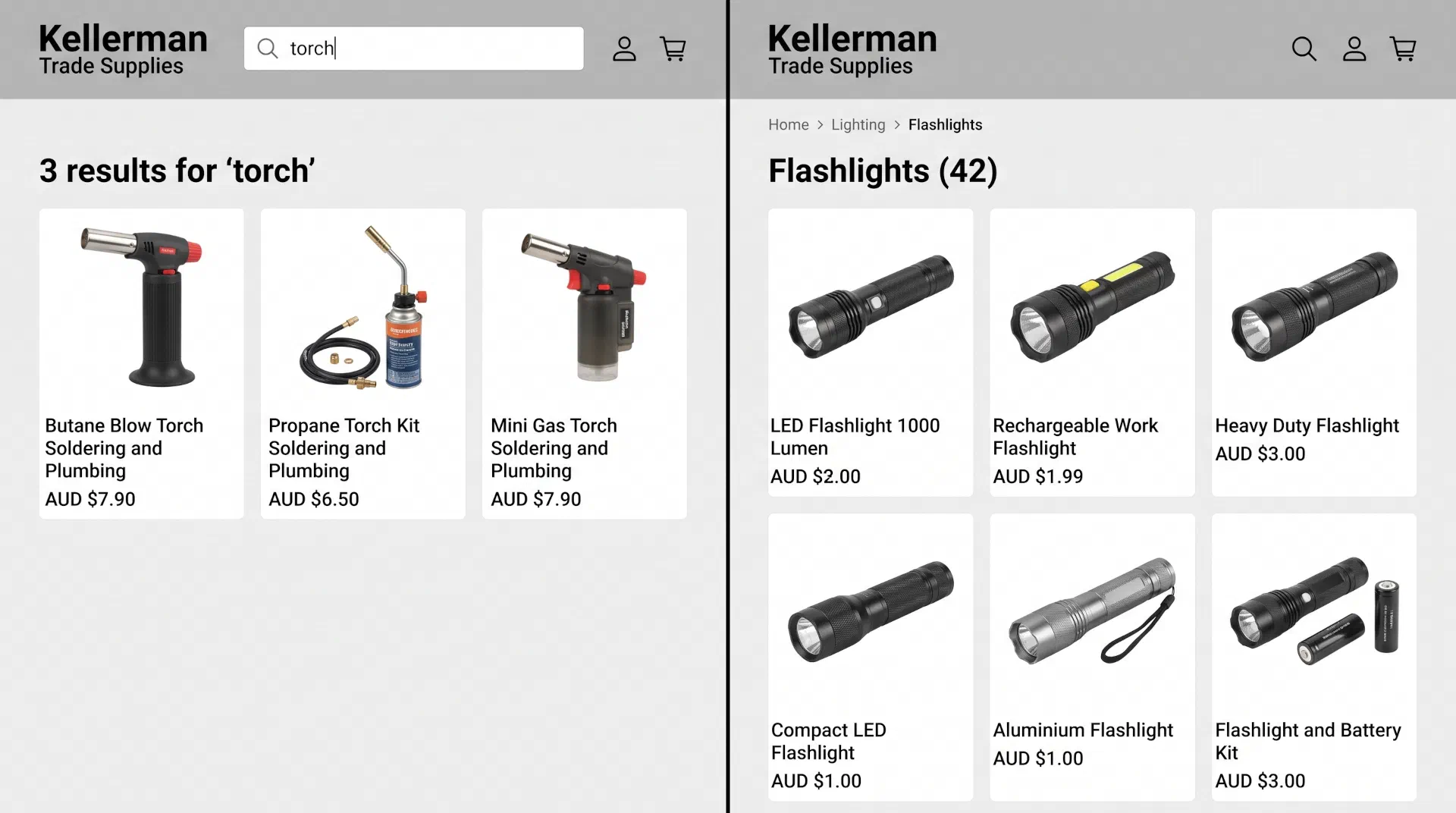
Contractions are the milder version of the same problem. Someone searching “hi-vis” or “trackies” may get lucky, since enough of the formal term survives in the shortened form for a well-configured engine to bridge it. Whether it does is a function of how your index is set up rather than anything you should count on. Sizes behave the same way, written as “10.5”, “3/4” and “size 10 1/2” interchangeably, as do plurals, where someone searches “AA batteries” and your titles say “AA battery”.
No search engine invents this vocabulary for you. It comes from a synonym list that somebody maintains, built from what your customers actually type, which is why the query log matters more than any vendor’s feature list. Baymard scores abbreviation and symbol queries as mishandled on 54% of sites, second only to non-product searches.
You do not hold the data the query is asking about
This is the hardest of the four to fix, and the one that most often needs work outside the search platform. A customer wants a part that fits a specific make and model of car, a filter for a specific fridge model, a cartridge for a printer they own. Answering that requires a compatibility relationship to exist in your product data as structured data. If it does not exist, no engine can reason its way to the answer, and no synonym list will help.
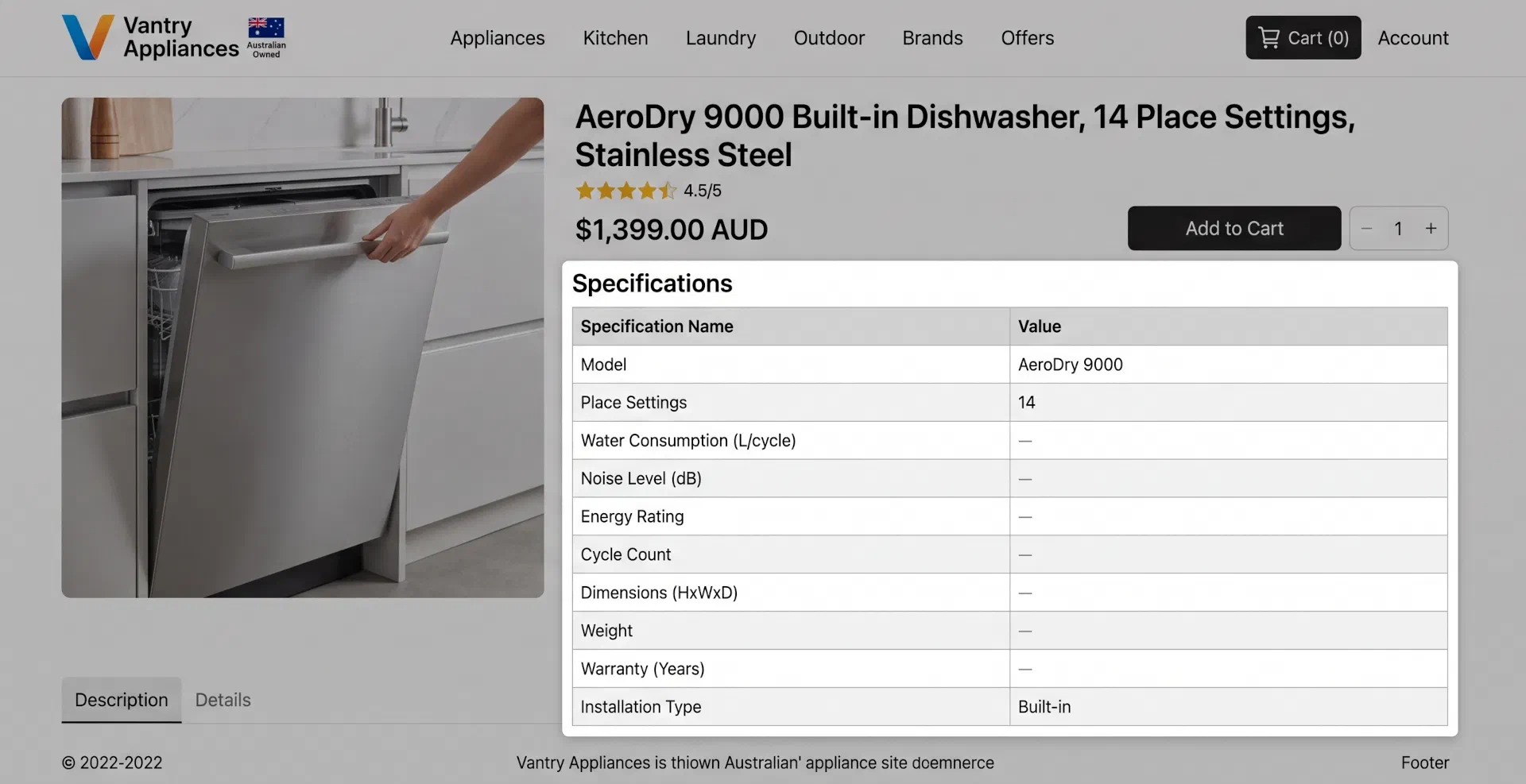
Symptom queries work the same way. “Blocked drain”, “oil leak”, “dry scalp” only return useful results if products carry the problem they solve as an attribute, or if you hold content mapping symptoms to products and that content is indexed. Feature and use case queries (“waterproof size 10”, “camping stove”) depend on the same thing: attributes that are populated, and carried through into the index rather than stopping at the ERP.
These present as search problems and are product data problems. Traced back, the cause is usually that the attribute is empty for most of the catalogue, or that it is populated in the PIM and never mapped into the search index. If that sounds familiar, it is one of the clearer signals that a PIM is worth considering, or that the one you have is not feeding the frontend properly.
Autocomplete is installed but unfinished
Most stores have autocomplete because it ships with the search platform. Fewer have looked at it since it was switched on. The recurring problems are presentational: suggestion lists long enough to need a scrollbar, category scope suggestions styled identically to query suggestions so customers cannot tell them apart, no visual difference between what the customer typed and what is being predicted, and product thumbnails or trending searches crowding out the suggestions themselves. On mobile these compete with sticky buttons and chat widgets at spacing that makes a mistaken tap likely.
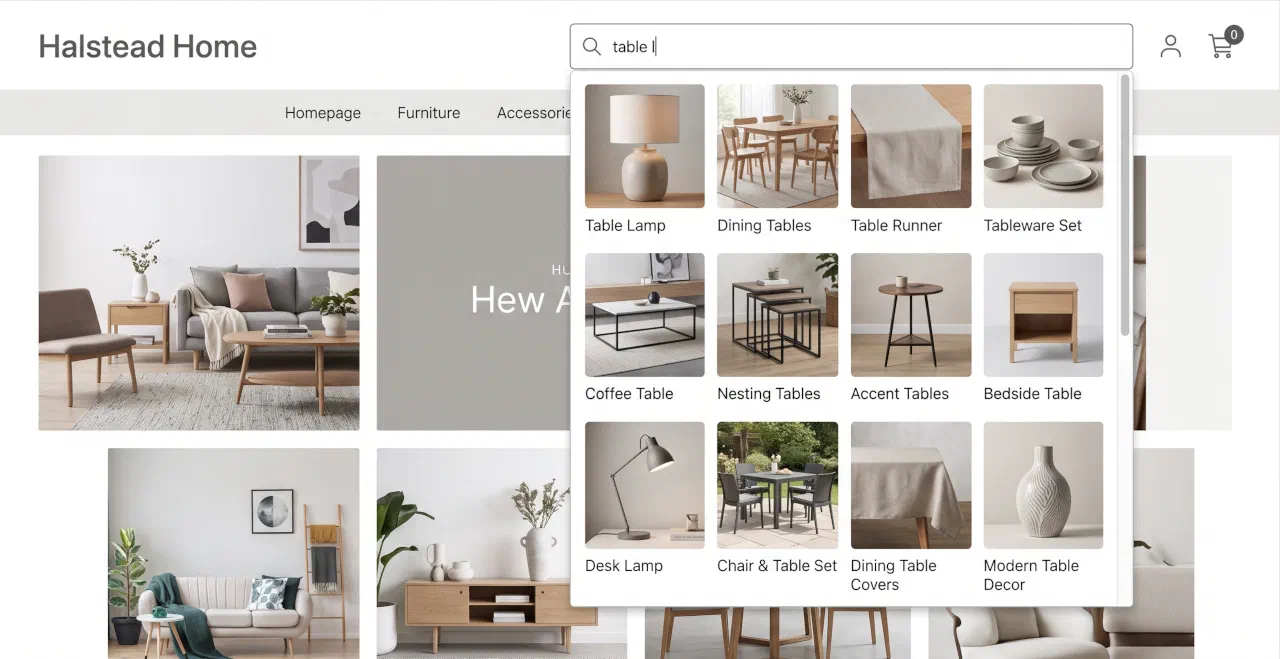
The real value of autocomplete is that it teaches customers the vocabulary your catalogue uses. Someone who types “hi-vis” and sees “high visibility workwear” suggested has learned how to search your store, which is cheaper than teaching your index every synonym in Australian English. Baymard’s numbers here are stark: 80% of sites provide autocomplete, up from 72% when they first measured it in 2014, and only 19% get the implementation details right.
What Baymard’s research shows
Baymard Institute has been researching product finding since 2013, and the current edition is built on 5,550 hours of usability testing across 219 moderated think-aloud sessions covering twelve large retailers including Staples, Best Buy, Newegg, Nordstrom and Gap, and distilled into a published set of UX guidelines.
Their search benchmark rates 56% of sites as mediocre or worse, with performance falling as screens get smaller: 46% of desktop sites rate mediocre or worse, 58% on mobile, 64% in apps. These are not stores without search.
Their breakdown by query type is the part worth keeping:
| Query type | What the customer types | Share of sites with issues |
|---|---|---|
| Exact | A specific product name or model number | 12% |
| Product type | A category, like “sandals” or “cordless drill” | 20% |
| Symptom | A problem to solve, like “oil leak” | 37% |
| Feature | An attribute, like “waterproof size 10” | 39% |
| Use case | A situation, like “camping stove” | 43% |
| Compatibility | Something that fits what they own | 44% |
| Abbreviation and symbol | “PJs”, “hi-vis”, “3/4 pants” | 54% |
| Non-product | “returns policy”, “click and collect” | 66% |
The gradient is the argument. The two types sites handle well are the two an engine solves on its own: type a model number or a category name and any competent index finds it. Failure rates climb as queries move away from matching words in your product titles and towards describing intent, and every one of those cases needs something the engine cannot infer.
What this means for a replatform decision
None of the above is an argument against upgrading your search platform. If your current search cannot handle typos, has no synonym support, or cannot be tuned without a deployment, then it might be necessary to replace it, and we have compared the main options elsewhere.
The mistake is treating the migration as the project. A new engine pointed at the same product-only index, with an empty synonym list and the same gaps in attribute coverage, fails the same six query types with better response times. Budget the configuration and data work as the substance of the project and the platform choice as the enabler, rather than the reverse.
Diagnosing your own site this week
You can get most of the way to a diagnosis in half an hour. Run these searches on your own store and watch what comes back:
- Your top selling product, using the nickname or abbreviation customers use rather than its catalogue title
- A size written the way a customer writes it, including fractions and half sizes
- “returns policy”, then “delivery”, then “click and collect”
- A common misspelling of your biggest brand
- A problem your products solve, phrased as the problem
- If you sell parts or accessories, a compatibility query naming a model you stock parts for
- A product you discontinued last year
Then look at the search report and inspect it using the approaches described above. If the high-volume, low-click list surprises you, that is the finding.
What to fix first
In rough order of return on effort: index your content pages so non-product queries work, build a synonym list from your own zero-result and low-click logs, fix autocomplete presentation, then work on attribute coverage for feature, compatibility and symptom queries. The last one is the largest job and pays back over the longest period.
That final item is where search stops being a frontend task. Attribute coverage depends on how product data moves out of your ERP or PIM into the search index, how often it syncs, and whether the fields your merchandisers need survive the trip. The same attributes drive the filters on your listing pages, which we cover in our post on ecommerce filtering UX. That layer is most of what we do, through backend integration work and on Shopify and Adobe Commerce builds, and search quality is one of the clearer symptoms of whether it is set up properly.
If you would rather have your search scored against the research than do it yourself, our UX audit is led by a Baymard-certified UX Professional and covers on-site search as one of its areas. Otherwise, get in touch and we can look at your search with you.
Frequently asked questions
Will a faster search engine fix our results?
It will fix speed, typo tolerance and ranking control, which are worth having. It will not fix queries that fail because the answer was never in the index: non-product searches, terminology your catalogue does not use, and questions about compatibility or symptoms that depend on attributes you do not hold. Those behave identically on any engine. If your current search cannot be tuned at all, replacing it is a sensible first step, but treat the configuration and data work as the actual project.
How do we work out which searches our site handles badly?
Pull your internal search report and sort it two ways. Zero-result queries show what the index is missing. High-volume queries with low click-through show where results looked plausible but were not useful, which is the more valuable list and the one most teams never review. Group what you find by the shape of the query and the failures usually cluster in two or three areas rather than spreading evenly.
Is autocomplete worth the effort for a smaller catalogue?
Yes, for a different reason than on a large catalogue. With fewer products it matters less for narrowing results and more for teaching customers the words your site uses. If your titles use supplier terminology and your customers use shorthand, suggestions close that gap immediately. The implementation details Baymard tests, such as list length, styling and mobile spacing, are inexpensive to correct once someone reviews them properly.
Do synonyms belong in the search engine or in our product data?
Both, and the split matters. Synonym and query rewriting rules belong in the search platform where merchandisers can maintain them without a deployment. Structured facts such as compatibility relationships, materials, sizes and use cases belong in your product data, flowing from the PIM or ERP into the index. Teams that push everything into synonym rules end up with a list nobody can maintain. Teams that wait for perfect product data never ship. Use rules for vocabulary and data for facts.